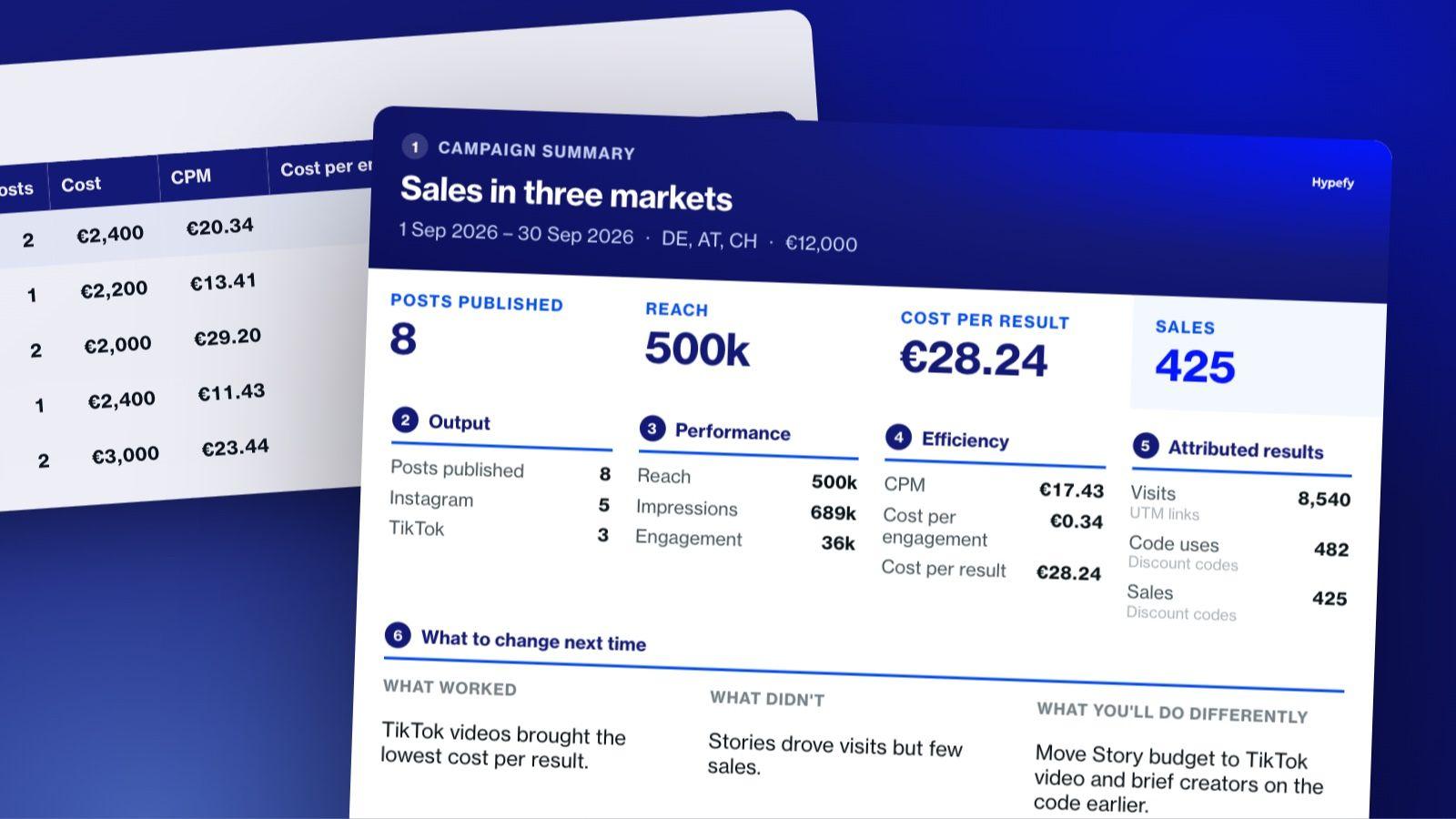
Every campaign report answers four questions: what went live, what it reached, what it cost per result, and what it can take credit for.
Collecting the data is the slow part. Reach sits in each creator's private analytics, Meta's API (the connection tools use to pull Instagram data) only returns Story metrics for 24 hours, and fees, links, and sales live in separate files.
An analytics tool tells you what the content did, while an attribution tool tells you what the content caused, such as a visit, a signup, or a sale.
Before buying either, check that it captures creator data automatically, saves Stories before they expire, and shows creator cost next to results.
Agencies also need separate client workspaces, branded exports, the same metric definitions for every client, and permissions so each client sees only its own data.
Three reporting rhythms cover every reader: a live view during the campaign, a full report once posts stop gaining views, and a quarterly roll-up for leadership.
A free influencer campaign report template is included below, with a summary tab, a per-creator tab, an automatic efficiency calculation, and a one-page client summary.
An influencer campaign report has to show what was published, what it reached, what it cost per result, and what it can take credit for.
Influencer marketing reporting often takes days, because the data sits in four different places, from each creator's own analytics to your fee spreadsheet, your list of post links, and your store or Google Analytics.
Below, you'll find what belongs in an influencer marketing report, a free template you can use today, and a comparison of the influencer analytics tools and attribution tools that do the job. It also shows how to stop rebuilding your spreadsheet after every campaign.
Our influencer marketing return on investment (ROI) guide covers all six revenue attribution methods in detail. They range from discount codes and UTM links, meaning links with tracking tags Google Analytics can read, to holdout tests.
The 6 Parts of an Influencer Campaign Report
A good influencer campaign report starts with the big picture, moves into the detail, and ends with a decision.
1
Campaign Summary
Goal, budget, markets, and dates
Read by
Everyone
2
Output
Posts published per creator and per platform
Read by
The campaign manager
3
Performance
Reach, impressions, engagement, and saves
Read by
The marketing team
4
Efficiency
CPM, cost per engagement, and cost per result
Read by
Finance and leadership
5
Attributed Results
Visits, code uses, signups, and sales
Read by
The marketing lead
6
What to Change Next Time
What worked, what didn't, and what you'll do differently
Read by
The next campaign's team
Each part of the report answers a different question for a different reader, from the campaign manager to finance and leadership.
Build it in this order:
Campaign summary. Start with the goal, budget, markets, and dates. Anyone who opens the report, from the campaign manager to the chief financial officer (CFO), should know what the campaign set out to do before reading anything else.
Output. List the posts published per creator and per platform. The campaign manager uses this part to check that every creator delivered what the contract promised.
Performance. Show reach, impressions, engagement, and saves. The marketing team reads this part to see which creators and formats got attention.
Efficiency. Divide cost by results to get CPM (cost per thousand impressions), cost per engagement, and cost per result. It's the part that's easiest to leave out and the one a finance or leadership reader needs most, since it shows what each result cost.
Attributed results. Show the visits, code uses, signups, or sales you can connect to the campaign, and name the method behind each number. The marketing lead uses this part to show what the campaign actually caused.
What to change next time. Close with a short read on what worked, what didn't, and what you'll do differently. A few lines are enough, as long as they give the team planning the next campaign a clear decision.
For what each metric means, see our influencer marketing KPIs guide. To match metrics to your campaign goal, use the ROI guide linked above.
Free Influencer Campaign Report Template
Our free influencer marketing report template gives you a ready-made structure for your next campaign report. Download the template:
To use it, you fill in some fields by hand, and the rest calculate themselves.
The is built so you can paste rows straight out of a platform export.
Why Reporting Takes So Long
The slow part of reporting is getting the numbers into one place. Here's what that looks like in practice.
Reach and impressions aren't public. On Instagram and TikTok, these numbers sit in each creator's own analytics. Unless creators connect their accounts to a tool, someone has to ask each one for screenshots, then chase the ones who forget.
Stories expire. A Story disappears after 24 hours, and Meta's developer documentation says Story metrics are only available through its API for those same 24 hours. If nobody captured them in time, you're left asking the creator for screenshots, if they still have them.
Everything else is scattered. Creator fees sit in one spreadsheet, post links in another, and sales in your eCommerce backend or Google Analytics.
With 15 creators across three markets, that means 15 sets of screenshots, three currencies, and several sales sources to merge by hand.
So the first job is capturing the data while the campaign runs, and analysis comes after. A Story metric nobody saved within 24 hours, for example, can't be pulled through the API later, whichever tool you buy.
Analytics Tools and Attribution Tools Are Not the Same Thing
Separate the two before you compare tools, since they solve different problems.
An analytics tool tells you what the content did. It covers reach, engagement, audience quality, and how each creator performed.
An attribution tool tells you what the content caused. It connects a post to a website visit, a discount code, a signup, or a sale.
Many influencer platforms handle analytics well and influencer marketing attribution only in part, usually through codes and tracked links. Dedicated attribution software works the other way around. It tracks conversions across channels well but doesn't manage creators, briefs, or fees.
So start by naming the problem you have. If you can't get reach numbers out of your creators, you have a capture problem, and an attribution tool won't fix it. If you have all the numbers but can't tell which posts drove sales, you have an attribution problem.
8 Things to Look For in an Influencer Analytics and Attribution Tool
Take this checklist to every demo call. Each point comes with the answer you want to hear.
What to check
Question to ask
Good answer
1. Automatic data capture
Does the tool pull post data by itself, or does someone have to type it in?
Posts are captured automatically once a creator joins the campaign.
2. Story capture before expiry
How are Stories saved within the 24-hour window?
Automatic capture, plus a clear list of which platforms it covers.
3. Codes and tracked links
Are discount codes and UTM links created inside the tool or by hand?
The tool creates them per creator and ties results back on its own.
4. eCommerce and analytics integrations
Which stores and analytics tools connect, such as Shopify, WooCommerce, or Google Analytics?
Each integration is named, along with the data it brings in.
5. Multiple markets and currencies
How does the tool handle campaigns across countries?
One report in a single currency, with the original amounts kept.
6. Creator cost next to results
Do creator fees sit in the same view as performance?
Yes, so cost per result works itself out.
7. Exports and white-label reports
Which formats can you export, and can reports carry your or your client's branding?
A branded report plus raw data you can download.
8. Historical data
How long is past campaign data kept?
Long enough to compare campaigns year over year.
Then ask one more question that's easy to forget: what happens to your data if you stop paying? Modash, for example, says it deletes account data 90 days after cancellation, while GRIN says your customer relationship management (CRM) records, affiliate links, and program data stay in place.
12 Best Influencer Analytics and Attribution Platforms
Here's how the 12 platforms differ in what each one is, what it measures, its main limit, and who it suits.
Platform
What it is
What it measures
Main limit
Who it suits
Hypefy
Managed campaign platform
Reach, impressions, engagement, link clicks, and code or link conversions, per post
Instagram and TikTok only
Brands that want the report built while the campaign runs
CreatorIQ
Enterprise creator marketing suite
Program reporting, competitive benchmarking, brand safety
No published pricing
Large brands and agencies with governance needs
Traackr
Creator marketing platform
Campaign reports and brand benchmarking
No published pricing
Enterprise brands, especially in beauty and fashion
Views, engagement, clicks, EMV (estimated media value, meaning what the same exposure would cost as paid ads), CPM, ROAS (return on ad spend), Shopify sales
Public content only, no TikTok Stories
Brands with someone in-house to run campaigns
impact.com
Partnership management platform
Conversions, lifetime value, and ROI per partner
No published pricing on its homepage
Brands running affiliate, creator, and referral programs together
Cometly
Multi-channel attribution software
Ad spend to pipeline and revenue
No creator management
B2B SaaS teams attributing across ad channels
Sprout Social
Social media suite with influencer marketing
Campaign summaries, custom reports, link, UTM, and pixel attribution
No published pricing on its influencer page
Teams already reporting on social in Sprout
Meltwater (formerly Klear)
Media intelligence suite with influencer marketing
Reach, engagement, EMV, sales via Shopify and WooCommerce
No published pricing
Teams that want influencer data next to media monitoring
1. Hypefy
Good for:Brands that want campaign data collected per post and per creator while the campaign runs.
Limitations:Covers Instagram and TikTok only, and attribution runs through personal codes and links.
Hypefy tracks reach, impressions, engagement, link clicks, and conversions in a live dashboard, and turns them into a shareable report in a few clicks. The full model is covered further down this page.
2. CreatorIQ
Good for:Large brands and agencies that need program-wide reporting and governance.
Limitations:Pricing is on request, and the platform is built for established teams.
CreatorIQ offers centralized program reporting and competitive benchmarking, plus a brand safety product called SafeIQ. CreatorIQ says it's trusted by 1,300+ brands and agencies.
3. Traackr
Good for:Enterprise brands that want to benchmark their creator programs against competitors.
Limitations:Pricing is shared only on a call with a platform specialist.
Traackr organizes its platform around planning, activating, and measuring creator programs. Its AI assistant generates reports on what worked and what didn't, and its Brand Vitality Score lets you compare brands.
4. Upfluence
Good for:eCommerce brands that want sales tracked per creator through Shopify or WooCommerce.
Limitations:Sales tracking and reporting start on the Scale Programs tier, and every plan has a 12-month minimum.
Upfluence adds a sales analytics dashboard, tracked sales, and affiliate and discount programs on its Scale Creator Programs and Autopilot tiers. Pricing is custom and set after an initial call.
5. GRIN
Good for:eCommerce brands running affiliate programs on Shopify.
Limitations:Running reports and analysis uses up credits, and stores outside Shopify need developer work.
GRIN includes affiliate links, discount codes, and GMV tracking on every plan, with customizable dashboards from the Starter plan at $200 a month. Plans are month-to-month.
6. Aspire
Good for:Brands running product seeding and UGC (user-generated content) programs.
Limitations:No published pricing.
Aspire ships products to creators through its Shopify integration and keeps creator content in one library. Its Impact Dashboard shows reach, engagement, and conversions in real time, and its Sales Dashboard ties revenue to creator activity.
7. HypeAuditor
Good for:Teams that want to check audience quality and spot fake followers before paying a creator.
Limitations:Plan prices aren't published, so you'll need to contact sales.
HypeAuditor offers audience, performance, and fraud insights for each creator, plus influencer campaign tracking. It also runs free tools, such as an Instagram fake follower checker.
8. Modash
Good for:Brands with at least one person in-house who'll run the campaigns.
Limitations:Tracks only publicly accessible content, and it doesn't track TikTok Stories.
Modash says it automatically captures every post, video, and Story creators publish about your brand, apart from TikTok Stories, with no creator sign-up needed. It calculates EMV, CPM, and ROAS on its own and shows Shopify sales per creator through codes and links.
9. impact.com
Good for:Brands running affiliate, creator, and referral programs from one place.
Limitations:Pricing isn't listed on its homepage, and the platform covers all partnership types rather than influencer campaigns alone.
impact.com tracks conversions, lifetime value, and ROI for each partnership, with cross-device tracking. It also handles partner payouts tied to the outcomes you choose. Plans start at $30 a month on the Starter tier, with Enterprise pricing on request.
10. Cometly
Good for:B2B SaaS teams that need to connect ad spend to pipeline and revenue across many channels.
Limitations:It doesn't manage creators, and there's no free trial.
Cometly offers multi-touch attribution with a tracking pixel and server-side tracking. It connects to ad platforms such as Meta, Google, LinkedIn, and TikTok.
11. Sprout Social
Good for:Teams that already manage and report on social media in Sprout.
Limitations:No pricing on its influencer marketing page.
Sprout Social covers creator discovery, a creator CRM, and content approvals. Its report builder and customizable campaign summaries sit alongside attribution through affiliate links, UTMs, or pixels.
12. Meltwater (Formerly Klear)
Good for:Teams that want influencer results next to their media monitoring.
Limitations:No published pricing.
Klear's website now redirects to Meltwater's influencer marketing page. Meltwater reports reach, engagement, and EMV, attributes sales through Shopify, WooCommerce, codes, and links, and offers downloadable reports agencies can customize.
Point Tools or One Platform That Does Everything
With a stack of point tools, meaning separate tools that each do one job, you rebuild the numbers after the campaign from four sources, and anything nobody captured at the time is lost.
Where does your team spend more time?
Building the report
Change your tools
Start with a platform that records data as campaigns run
A platform that runs the campaign records cost, content, and results as they happen, so the report is ready when the campaign ends instead of being rebuilt from scratch.
That said, point tools are the better choice in three cases:
Your team already has a campaign process it likes.
Your reporting has to cover channels beyond influencer, such as paid search or email.
You're an agency that has to report inside a client's existing tools.
If your team spends more time building the report than reading it, start by changing your tools. If the numbers are easy to gather but hard to make sense of, work on your method, and the ROI guide is the place to start.
Reporting for Agencies Running Several Clients
Agencies need everything above, plus five things a single brand doesn't:
Separate workspaces per client, so campaigns, creators, and data never mix
White-label or branded exports, so reports go out under your agency's name or the client's
The same metric definitions for every client, so results stay comparable across accounts
Permissions, so each client sees only its own data
Roll-up views across all clients, so you can see the whole book of business at once
Influencer campaign reporting also eats into billable time. Every hour spent chasing screenshots and merging spreadsheets is an hour you either bill the client for or absorb yourself.
To put a number on it, track how many hours each report takes for one month, then multiply by your hourly rate to see what manual reporting costs your agency.
How Often to Report and Who Reads It
Report on three rhythms:
A live view during the campaign for the person running it, so late posts and weak creators get caught while there's still time to act.
A post-campaign report once the posts stop picking up new views. Check the last few posts, and when their numbers flatten out, the results are ready to report.
A quarterly roll-up for leadership, with campaigns compared side by side.
1Live View
2Post-Campaign Report
3Quarterly Roll-Up
Total views
Campaign liveLast postViews flatten outEnd of quarter
Send the post-campaign report once the views flatten out, and roll campaigns up every quarter for leadership.
Each reader wants a different part of the same report. The campaign manager wants per-creator performance, the marketing lead wants efficiency against the goal, and finance or leadership want cost against result and little else.
Build one report with three levels of detail, so everyone works from the same numbers.
How Hypefy Reports Campaign Results
Hypefy collects performance data per post and per creator across Instagram and TikTok while the campaign runs. That includes reach, impressions, engagement, link clicks, and conversions from personal codes or links.
Creator fees sit in the same view as the results they produced, so cost per result is already worked out and the report doesn't need assembling. You can follow results live in Hypefy's influencer marketing dashboard and generate a report for your team or clients in a few clicks.
Hypefy removes the work of collecting and assembling the data. It doesn't solve the harder question of proving what a post caused, so for that you'll still need the methods in our ROI guide.
There's no subscription, and Hypefy's cost sits inside your campaign budget, which starts from €2,500. Before you launch, you can estimate reach, conversions, and ROI with the free ROI calculator and find creators with the influencer discovery tool.
Influencer marketing reporting is the process of pulling a campaign's content, reach, costs, and results into one report.
It shows what was published, what it reached, what it cost per result, and what it can take credit for.
2. What should an influencer campaign report include?
An influencer campaign report should include six parts:
Campaign summary
Output
Performance
Efficiency
Attributed results
What to change next time
The efficiency part, covering CPM, cost per engagement, and cost per result, is the one most reports leave out.
3. What is the best influencer marketing analytics tool?
The best influencer marketing analytics tool depends on what you need to measure.
HypeAuditor and Modash are built for audience quality and creator analytics, while CreatorIQ and Traackr add benchmarking for enterprise programs.
If you want the report built while the campaign runs, Hypefy captures results per post and per creator on Instagram and TikTok.
4. What is the best attribution tool for influencer campaigns?
The best attribution tool for influencer campaigns depends on where your sales happen.
eCommerce brands can see sales by creator in Upfluence, GRIN, or Aspire through Shopify, codes, and links.
Brands running partnership programs can use impact.com, and teams attributing across many ad channels can use Cometly.
5. What is the difference between influencer analytics and influencer attribution?
Influencer analytics shows what content did, such as its reach and engagement, while influencer attribution shows what it caused, such as visits, signups, or sales.
Many influencer platforms do analytics well and attribution only in part.
6. How do agencies report on influencer campaigns for multiple clients?
Agencies report on influencer campaigns for multiple clients by using separate client workspaces, branded exports, and the same metric definitions across all accounts.
Permissions keep each client's data private, and a roll-up view shows results across every client.
7. How do you get reach data from creators?
You get reach data from creators by asking for screenshots of their analytics or by using a tool that connects to their accounts.
Write the request into the contract, and collect Story data within 24 hours, before Meta's API stops returning it.
8. Can you track influencer marketing in Google Analytics?
Yes, you can track influencer marketing in Google Analytics by adding UTM parameters to every creator's link.
Google recommends always using utm_source, utm_medium, and utm_campaign, and the results show up in the Traffic acquisition report.
9. How long after a campaign should you report?
You should report on an influencer campaign once its posts stop picking up new views.
Check the view counts on the last few posts, and when they flatten out, the numbers are ready to report.
10. Do you need a separate attribution tool if your platform has reporting?
You don't need a separate attribution tool if your platform's codes, tracked links, and store integration already answer your questions.
Add one when you need to attribute results across many channels at once, such as paid ads, email, and influencer together.
About the Author
Kristina Macekovic
Strategist at Hypefy
Kristina Maceković is a Strategist at Hypefy, a company revolutionizing influencer marketing with AI. With a background in program management and technical consulting, including roles at emerging technology companies Span and bonsai.tech, Kristina brings a strong understanding of technology and data-driven strategies. Her insights help B2B marketing professionals navigate the evolving landscape of influencer marketing and leverage innovative solutions for exceptional ROI.