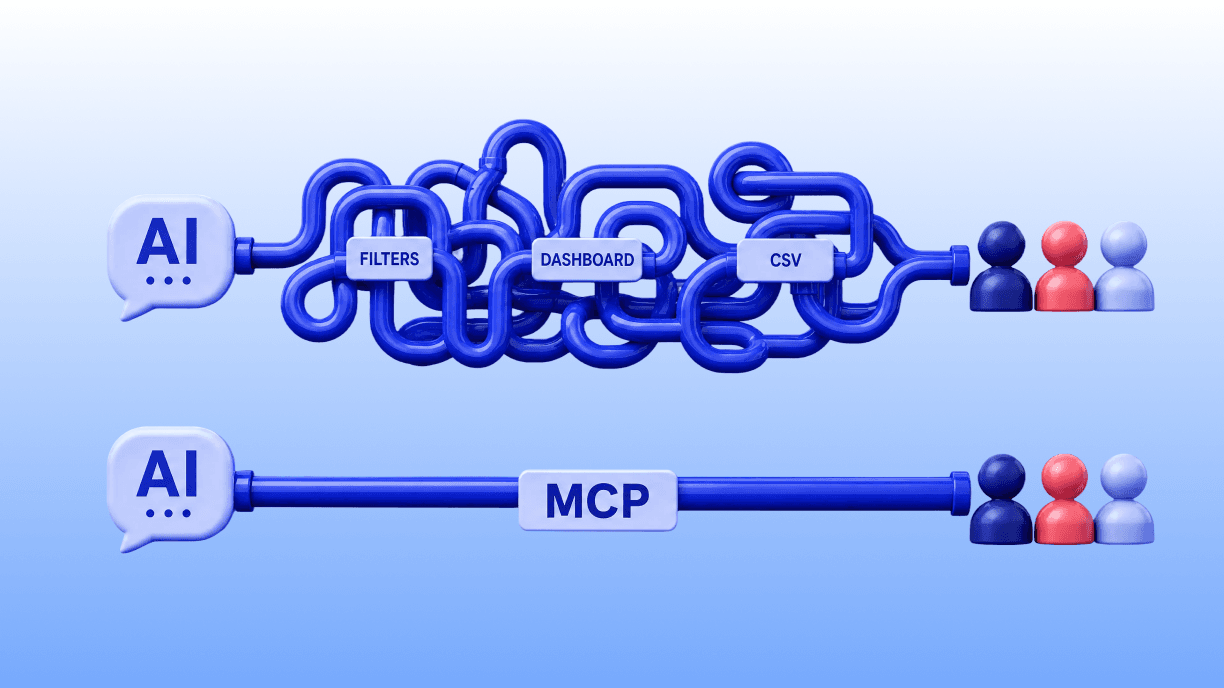
An influencer marketing MCP is a connection that lets an AI agent like Claude or ChatGPT search, score, and brief creators directly in the conversation, replacing the cycle of logging into a dashboard, stacking filters, exporting a CSV, and switching context to do something with the results.
This guide covers what MCP is, why it matters for influencer marketing in 2026, how the servers work technically, how to build a basic one, and how Hypefy's MCP gives you the same result without building anything.
What Is an Influencer Marketing MCP?
An influencer marketing MCP is a way for an AI agent to reach live creator data and campaign tools through the Model Context Protocol, so discovery and briefing happen inside the conversation.
MCP is Anthropic's open standard for connecting AI agents to external tools and data. It defines a consistent interface, where the AI agent (the client) connects to a server, and the server exposes a set of tools such as search, retrieval, and generation, which the agent calls in response to plain-language requests.
The standard is open, which means any tool or data source can expose an MCP server and any compatible AI agent can connect to it.
For influencer marketing specifically, this means the agent can search and score creators, answer planning questions, and generate campaign briefs without opening a separate dashboard.
You describe the creator you need in plain language.
The agent calls the server. The server returns a ranked shortlist with engagement scores, audience breakdowns, and contact handles. All of it happens in the same conversation.
The practical difference from a traditional platform is that a dashboard asks you to log in, set filters, export results, and then do something with them elsewhere. An MCP server surfaces the same data in response to a natural-language request, in context, without the context switch.
Hypefy's MCP is built on this model, with its creator data and campaign tooling exposed through an MCP server that connects to Claude Desktop, Claude Code, and any MCP-compatible client, including ChatGPT in Developer Mode.
Why MCP Matters for Influencer Marketing in 2026
MCP matters for influencer marketing because it moves creator discovery from a separate tool into the AI agent marketers already use, cutting the manual steps between a brief and a shortlist.
Marketing teams increasingly work inside AI agents, writing, planning, analyzing, and briefing. Influencer discovery has historically sat outside that workflow.
You work in Claude or ChatGPT to draft a strategy, then switch to a separate platform to find creators, then switch back to do something with the results. Each context switch costs time and breaks the thread.
MCP removes that switch. When a creator discovery server is connected to the AI agent, the whole workflow stays in one place.
You describe the campaign. The agent searches creators, returns a scored shortlist, answers budget questions, and drafts the brief, all in the same chat window where the strategy already lives.
The concrete gains are these:
Speed. A plain-language request replaces the filter stack you would otherwise configure by hand.
Planning in context. You can ask how many creators a budget covers in a specific market, with any special request factored in, get an answer, and immediately adjust the brief, all without leaving the conversation.
Staying in one workflow. The strategy, the creator search, the budget modeling, and the finished brief are all in the same place. There is no assembly required when each step lives in a different tool.
For teams already running campaigns, Hypefy's outreach tool handles the steps after discovery in the same platform.
How Do Influencer Marketing MCP Servers Work?
An MCP server exposes tools and data to an AI agent. When you ask the agent to find creators, it calls the server, retrieves scored results, and returns them in the conversation.
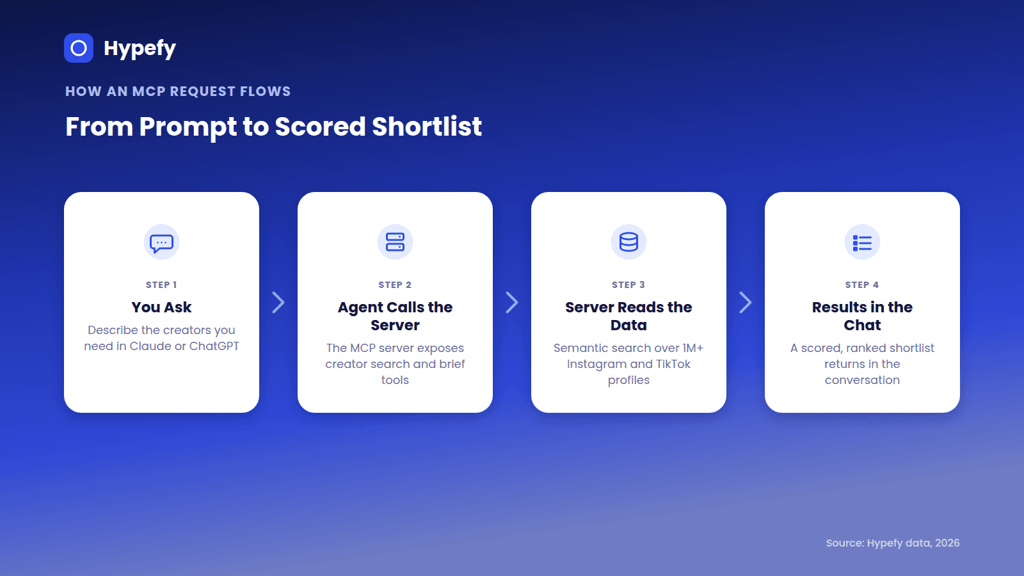
The flow has four components.
The client is the AI agent, Claude Desktop, Claude Code, ChatGPT, or any MCP-compatible application. It receives the user's natural-language request, decides which tools to call, calls them, and assembles the response.
The server is what exposes the tools. It defines what the agent can call, such as a creator search tool, a profile enrichment tool, and a brief generation tool.
Each tool has a defined input and output. The server receives the call, executes it against the underlying data, and returns a structured result.
The data layer is what the server points to, such as a creator database, an engagement scoring model, and an audience analysis service.
An MCP server is only as useful as the data and tools it exposes. A server pointing at thin or unvetted creator data returns thin, unvetted results.
Hypefy’s semantic matching is what makes the search layer useful. A basic creator search returns creators who match a keyword. Semantic matching reads the intent behind a brief and surfaces creators who fit even when their bios never mention the exact keyword.
A creator who posts weekly home-cooked family dinners matches a food campaign brief even if "food" appears nowhere in their profile. The server matches on content meaning instead of keywords.
The protocol layer, MCP itself, defines how the client and server communicate, including how tools are declared, how calls are structured, and how results are returned.
Because it is an open standard, any compatible client can connect to any compatible server. The same Hypefy MCP server that connects to Claude also connects to ChatGPT, without a separate integration.
How to Build a Basic Influencer Marketing MCP Server
Building your own MCP server gives you a creator discovery tool that connects directly to whatever data you have and exactly the tools your workflow needs:
1. Choose a framework or SDK. Anthropic publishes official MCP SDKs for several languages, including Python and TypeScript. Pick the language your team works in. The SDK handles the protocol layer, tool declaration, request handling, and response formatting, so you spend your time on the application logic instead of the plumbing.
2. Define the tools the server will expose. Tools are what the agent can call. For influencer marketing, a minimal useful set includes a creator search tool (takes a brief description, returns a list of creator profiles), a profile lookup tool (takes a handle or ID, returns engagement data and audience breakdown), and optionally a brief generation tool (takes campaign parameters, returns a structured brief).
Each tool needs a name, a description the agent uses to decide when to call it, and defined input and output schemas.
3. Connect a data source. This is the hard part, and it is worth being direct about it. An MCP server without good creator data is a well-structured empty box. You need a source of creator profiles with engagement data and ideally audience demographics.
Options include a third-party creator data API, your own database of creators you have previously worked with, or a social data provider. The quality of your results is the quality of your data.
4. Write the request handlers. For each tool, write the function that executes when the agent calls it. For the creator search tool, this means taking the input description, querying the data source, scoring the results against the brief, and returning a structured list. For a profile lookup, it means retrieving and formatting the engagement data for a specific creator.
5. Test with a compatible client. Connect the server to Claude Desktop, Claude Code, or any other MCP-compatible client. Send a plain-language request and check what comes back.
The test reveals whether the tool descriptions are clear enough for the agent to call the right tool, whether the results are structured usefully, and whether the semantic matching is surfacing relevant creators or only exact keyword matches.
The result is a working MCP server that connects your creator data to any compatible AI agent. The ongoing cost is maintaining it as creator data changes, as the protocol evolves, and as your tool needs grow.
For teams without the engineering resources, the Hypefy platform connects in minutes with no server to maintain.
Use the Hypefy MCP Instead
If you want influencer discovery through your AI agent without building and maintaining a server or sourcing creator data, the Hypefy MCP gives you that out of the box:
It provides live access to 1M+ curated creator profiles across Instagram and TikTok, expanding every day
Semantic search matches by content meaning
Engagement scores, audience breakdowns, and contact handles for each creator
Brief generation, all in the conversation
There is no subscription. Payment runs through Hypefy Smart Pricing, which sets each creator's rate from their recent performance and builds Hypefy's fee into the campaign budget.
The workflow in practice is straightforward.
You connect the server to Claude Desktop, Claude Code, or ChatGPT, describe the creator and campaign in plain language, receive a ranked shortlist with engagement scores, audience breakdowns, and contact handles, and generate a brief in the same chat.
The shortlist can be handed off to the Hypefy campaign team or routed into the tools you already use.
Agencies and growth teams can go further and build automated discovery pipelines with Claude Code or any MCP-compatible automation tool, then route ranked shortlists into their existing stack.
Developers get the full server spec on signup, with tools for creator search, profile enrichment, and brief generation across Claude Desktop, Claude Code, Cursor, and any MCP-compatible runtime.
The server is currently in early access. Join the waitlist and connect at Influencer Marketing MCP.
What an AI Agent Can Do With an Influencer Marketing MCP
With a creator MCP connected, the AI agent can handle the following without a separate platform.
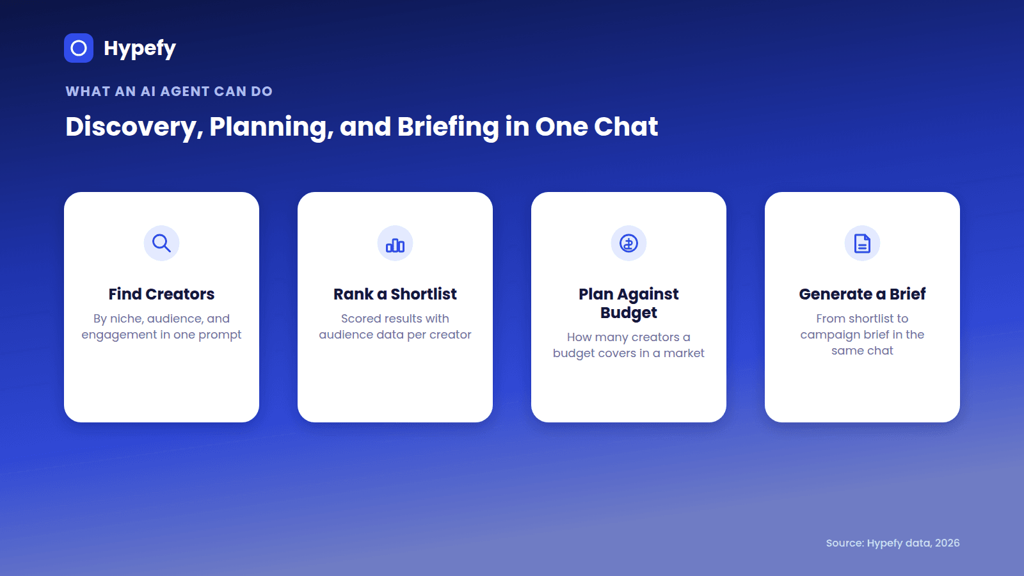
Find creators by niche, audience, and engagement in one prompt. Describe the campaign and target audience in plain language and receive a ranked shortlist with engagement scores and contact handles. No filter configuration required.
Get audience breakdowns per creator. For each creator in the shortlist, pull the audience breakdown to verify fit against the target customer profile before committing a budget.
Model how many creators a budget covers in a given market. Ask the agent how far a specific budget goes in a specific geography with any special requests factored in and get an answer in context. Adjust the parameters and get a revised answer immediately.
Generate a campaign brief in the same chat. Move from creator shortlist to structured brief without switching tools. The output is a campaign brief template you can refine in the same conversation.
Hand off to the Hypefy campaign team or route into the tools you already use. You can also continue the conversation to refine the approach further.
For setup instructions specific to Claude, the Claude influencer marketing guide covers the connection steps and prompt patterns.
For ChatGPT-specific setup and examples, the ChatGPT influencer marketing guide covers the same.
Building Your Own vs. Using a Ready MCP
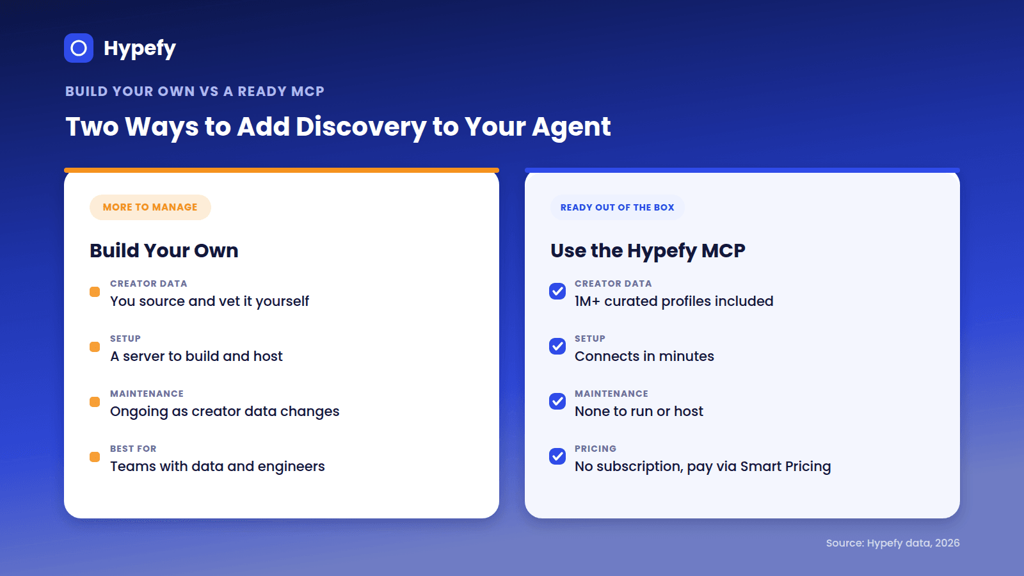
Factor | Build your own | Use Hypefy MCP |
|---|---|---|
Creator data | You source and maintain it | 1M+ curated profiles, maintained and expanded daily |
Setup time | Days to weeks depending on complexity | Add a server URL to your client |
Ongoing maintenance | Your team | Hypefy |
Customization | Full control over tools and data | Platform tools, plus the full server spec for developers |
Cost | Engineering time plus data source | No subscription, Smart Pricing inside the campaign budget |
Best for | Teams with their own creator data and engineering capacity | Teams who want results without infrastructure |
Building your own makes sense when you have a proprietary creator dataset you want to query through an AI agent or when the tools you need are specific enough that a ready solution does not cover them. Engineering teams at larger agencies or platforms with their own creator data fall into this category.
A ready MCP suits teams who want the workflow benefits without the infrastructure overhead. If the goal is running discovery and briefing through an AI agent, and you do not have a creator database or engineering resource to point at one, building your own server does not shorten the path to a useful result. The Hypefy MCP covers the same workflow without requiring either.
Common Mistakes to Avoid
1. Pointing a home-built server at thin-client or unvetted creator data. The server is only as useful as what it searches. A well-built MCP server on top of a creator database with outdated or unvetted profiles returns outdated, unvetted results. MCP is a protocol; it defines how the agent communicates with the server, and the intelligence comes from the data and tools behind it. Fix the data before shipping to the server.
2. Assuming every AI client connects the same way. The protocol is standard, but the setup path is not. Claude Desktop and Claude Code take a server URL directly, while ChatGPT requires Developer Mode, available under Settings > Apps > Advanced settings on a paid plan, before you can add a custom connector. Check what your client needs before you plan a workflow around it.
3. Over-scripting requests. Describing exactly which filters to apply and in which order removes the benefit of semantic search. Describe the intent, the campaign, the product, the target audience, and let the server match on meaning. "Find me micro creators in Croatian skincare with 3.5% engagement and 10,000 to 50,000 followers" produces worse results than "find micro creators whose content regularly features skincare routines for Croatian women in their 30s."
4. Ignoring engagement quality in returned results. A shortlist from an MCP server can include creators with follower counts and engagement rates that look fine at the profile level but reflect inauthentic audiences. Check comment quality, audience location, and engagement patterns before moving from shortlist to outreach.
5. Skipping the planning step. One of the most useful things an MCP-connected agent can do is answer budget and market planning questions before the campaign is set. "How many micro creators in Serbia can I activate on a €3,000 budget?" is a question that saves significant time later. Use the planning capability before committing to a structure.
Connect the Hypefy MCP
The Hypefy MCP is currently in early access. Join the waitlist at Influencer Marketing MCP and we will reach out as soon as your access is ready.
AI Influencer Discovery With MCP FAQs
1. What is an influencer marketing MCP?
An influencer marketing MCP is a connection that lets an AI agent like Claude or ChatGPT access live creator data and campaign tools through the Model Context Protocol. Discovery, scoring, and brief generation happen inside the conversation.
2. What does MCP stand for?
MCP stands for Model Context Protocol, an open standard created by Anthropic that defines how AI agents connect to external tools and data sources. Because it is an open standard, any compatible tool can expose an MCP server and any compatible AI agent can connect to it.
3. How is an influencer marketing MCP different from a traditional platform?
A traditional platform requires logging in, configuring filters, and exporting results to use elsewhere. An MCP server surfaces the same data in response to a natural-language request, inside the AI agent you are already using, without a context switch. The workflow stays in one place.
4. Do I need to build my own MCP server for influencer marketing?
No, you do not need to build your own MCP server. Building your own makes sense if you have proprietary creator data and engineering capacity. For teams who want creator discovery through an AI agent without building and maintaining infrastructure, the Hypefy MCP provides a ready connection with no subscription.
5. Can I use an influencer marketing MCP with Claude and ChatGPT?
Yes, you can use an influencer marketing MCP with both Claude and ChatGPT. MCP is an open standard and the Hypefy MCP server connects to both. Claude Desktop and Claude Code take the server URL directly. ChatGPT requires Developer Mode on a paid plan, which you enable under Settings, then Apps, then Advanced settings, before adding the Hypefy server as a custom connector. The tools and the results are the same in both.
6. How many creators does the Hypefy MCP cover?
The Hypefy MCP covers 1M+ curated creator profiles across Instagram and TikTok, with engagement scores and audience breakdowns available for each.
7. Is there a subscription to use the Hypefy MCP?
No, there is no subscription to use the Hypefy MCP. Payment runs through Hypefy Smart Pricing inside the campaign budget, and there is no monthly platform fee. The cost is tied to what the campaign uses.
8. Do I need a developer to use the Hypefy MCP?
No, you do not need a developer to use the Hypefy MCP. If you can add a server URL to Claude Desktop or another MCP client, you can run searches in plain language. Developers can also build automated pipelines with the full server spec.
9. What is the difference between using Claude for influencer marketing and using the Hypefy MCP with Claude?
On its own, Claude can advise on strategy but cannot see live creator data. With the Hypefy MCP connected, Claude searches real creators through Hypefy's embeddings and content analysis, and builds shortlists you can act on.